
Best Gaming Monitors 2026: 5 Top Picks Compared for 1080p, 1440p, 4K & 240Hz
Shopping for the best gaming monitor in 2026 is less about chasing the biggest number and more about matching resolution, refresh rate, panel technology, GPU power, desk size, and budget. These five displays cover very different use cases—from an affordable 24-inch 144Hz screen to a 32-inch 4K QD-OLED and a 27-inch 5K Mini-LED model.
Which Is the Best Gaming Monitor for You?
There is no single winner for every setup. A competitive player may benefit more from 240Hz at 1080p than from 4K resolution, while a creator or high-end PC gamer may prefer the clarity and contrast of a 4K QD-OLED. If you want a comfortable all-purpose screen for work, gaming, and media, 1440p at 144Hz sits in a very useful middle ground.
This gaming monitor comparison focuses on buyer intent: what each model is good at, where it compromises, and when spending more actually makes sense. Specifications were checked against manufacturer information where available; supplied marketplace pricing and ratings should be rechecked immediately before publication because they can change.
Dell 27 Plus QHD Monitor — S2725DSM

If you want the strongest all-around balance without paying for ultra-premium OLED hardware, the Dell S2725DSM is the easiest model here to recommend. Its 27-inch QHD resolution gives you a meaningful sharpness upgrade over 1080p without demanding the same graphics horsepower as 4K.
Dell lists a 2560×1440 resolution at 144Hz, a 1ms MPRT mode, 1,500:1 typical contrast, 350 cd/m² brightness, 99% sRGB coverage, AMD FreeSync, integrated 2×3W speakers, and a stand with height, pivot, tilt, and swivel adjustment. citeturn1search5turn1search10
The practical advantage is flexibility. It works as a gaming monitor, office display, and everyday entertainment screen without leaning too hard into any one niche. The main compromise is connectivity: Dell lists one HDMI and one DisplayPort, with no built-in USB hub in the specifications shown here. citeturn1search5
Key Specifications
| Specification | Details |
|---|---|
| Display | 27-inch IPS, 16:9 |
| Resolution | 2560 × 1440 (QHD) |
| Refresh Rate | 144Hz |
| Response | 1ms MPRT; 4ms GtG Extreme listed by Dell |
| Adaptive Sync | AMD FreeSync |
| Brightness / Contrast | 350 cd/m² / 1,500:1 typical |
| Color | 99% sRGB |
| Audio / Stand | 2×3W speakers; height, pivot, tilt, swivel |
How It Performs in Real-World Use
QHD at 27 inches is the sweet spot for many PC users. Text and UI elements look noticeably cleaner than 1080p, while 144Hz makes scrolling and fast games feel much smoother than a typical 60Hz display. The adjustable stand is also useful if the monitor doubles as a work screen. The built-in speakers are convenient for casual audio, although serious gaming still calls for headphones or dedicated speakers.
Who Should Buy It?
- PC gamers wanting a strong 1440p starting point.
- Users who want one screen for work and gaming.
- Buyers who value an adjustable ergonomic stand.
- People who prefer IPS and 99% sRGB coverage.
Who Should Avoid It?
- Competitive players specifically chasing 240Hz or higher.
- Buyers who want OLED-level black levels.
- Users who need USB-C video or a large USB hub.
- Gamers with hardware aimed at high-refresh 4K.
Pros
- Excellent 27-inch QHD balance
- 144Hz refresh rate
- Adjustable ergonomic stand
- Integrated 2×3W speakers
- 99% sRGB and FreeSync
Cons
- Only one HDMI input
- No USB hub listed
- Not a true HDR-focused display
- 144Hz is below 240Hz esports models
- IPS cannot match OLED black levels
Overall
The S2725DSM is the best gaming monitor here for buyers who want one sensible display rather than a specialist product. Its biggest weakness is that it is not built for extreme competitive refresh rates or OLED contrast, but its balance is hard to beat for everyday PC use.
MSI MPG 322URX QD-OLED

Here's where things get interesting: the MSI MPG 322URX is the enthusiast option, combining 4K resolution, QD-OLED contrast, and a 240Hz refresh rate. It is aimed squarely at high-end PC gaming rather than value shoppers.
MSI's official specifications list a 31.5-inch QD-OLED panel at 3840×2160, 240Hz, 0.03ms GtG, G-SYNC Compatible and AMD FreeSync Premium Pro, DisplayHDR True Black 400, two HDMI 2.1 inputs, DisplayPort 2.1a UHBR20, USB-C with up to 98W power delivery, and a 3-year warranty that includes burn-in coverage. citeturn0search0turn0search1
The real question is whether your PC can feed it. A 4K 240Hz monitor is most valuable when the rest of the system is powerful enough to produce high frame rates at 4K. If your games routinely run well below 100 fps, you are paying for headroom you may not use.
Key Specifications
| Specification | Details |
|---|---|
| Display | 31.5-inch QD-OLED, 16:9 |
| Resolution | 3840 × 2160 (4K UHD) |
| Refresh Rate | 240Hz |
| Response | 0.03ms GtG |
| Adaptive Sync | G-SYNC Compatible / FreeSync Premium Pro |
| HDR | DisplayHDR True Black 400; 1000-nit peak specification |
| Ports | 2× HDMI 2.1, DP 2.1a, USB-C up to 98W |
| Protection | OLED Care 2.0; 3-year burn-in warranty |
How It Performs in Real-World Use
OLED's per-pixel lighting gives this monitor a fundamentally different look from the IPS displays in this comparison. Dark scenes can look much deeper, while 240Hz provides the fluidity competitive gamers want. The USB-C connection with 98W power delivery also makes it attractive as a premium laptop-and-desktop display. MSI confirms support for 4K at up to 240Hz through HDMI, DisplayPort, and Type-C. citeturn0search0
Who Should Buy It?
- Enthusiast PC gamers with powerful GPUs.
- Players who want 4K and 240Hz together.
- Users who prioritize OLED contrast and color.
- Laptop users who can benefit from 98W USB-C power.
Who Should Avoid It?
- Budget buyers.
- Users whose GPU cannot drive high-refresh 4K.
- People who mostly use static office applications and do not need OLED.
- Anyone unwilling to follow OLED care guidance.
Pros
- 4K 240Hz QD-OLED
- Exceptional OLED contrast
- 0.03ms GtG specification
- HDMI 2.1 and DP 2.1a
- 98W USB-C power delivery
Cons
- Very expensive
- Needs powerful hardware to shine
- OLED care remains important
- Premium price is unnecessary for casual users
- Less compelling if you play mostly low-demand titles
Overall
The MPG 322URX is the best 4K gaming monitor in this group for buyers who want a premium, high-refresh OLED experience. The biggest weakness is simply cost: it is overkill for many PCs.
LG 24G414B-B UltraGear

If your priority is spending as little as possible while still getting a modern high-refresh gaming monitor, the LG 24G414B-B makes a lot of sense. It keeps the resolution at 1080p and the screen size at 24 inches, which is exactly where a budget gaming monitor can be most practical.
LG lists a native 144Hz refresh rate, 1ms Motion Blur Reduction, NVIDIA G-SYNC compatibility, AMD FreeSync, HDR10, up to 99% sRGB, Dynamic Action Sync, Black Stabilizer, LG Switch software, and stereo speakers. citeturn1search0turn1search2
The important trade-off is resolution. At 24 inches, 1080p is still a sensible gaming target, particularly for competitive games where high frame rates matter more than pixel density. It is less attractive for users who want a large desktop canvas or very sharp text.
Key Specifications
| Specification | Details |
|---|---|
| Display | 24-inch IPS, 16:9 |
| Resolution | 1920 × 1080 (FHD) |
| Refresh Rate | 144Hz |
| Motion Feature | 1ms MBR |
| Sync | G-SYNC Compatible / AMD FreeSync |
| HDR / Color | HDR10; up to 99% sRGB |
| Stand | Tilt and height adjustable |
| Extras | Stereo speakers; LG Switch; Black Stabilizer |
How It Performs in Real-World Use
For esports and mainstream PC gaming, 144Hz at 1080p is a sensible combination. The lower resolution also makes it easier for a midrange graphics card to reach high frame rates. LG's support for both G-SYNC Compatible and FreeSync gives it useful flexibility across GPU platforms. citeturn1search0
Who Should Buy It?
- First-time gaming PC builders.
- Competitive gamers on a budget.
- Users with modest or midrange GPUs.
- Buyers who want a compact 24-inch screen.
Who Should Avoid It?
- Users who want QHD or 4K detail.
- People needing a large productivity canvas.
- Buyers prioritizing HDR image quality.
- Anyone who expects premium OLED contrast.
Pros
- Affordable 144Hz gaming target
- IPS panel
- G-SYNC Compatible and FreeSync
- Up to 99% sRGB
- Adjustable stand and speakers
Cons
- Only 1080p resolution
- Smaller 24-inch workspace
- HDR is not its main strength
- Not designed for premium 4K gaming
- MBR can involve feature trade-offs
Overall
The LG 24G414B-B is the best budget gaming monitor here for buyers who care about smooth 1080p gameplay and do not need a high-resolution desktop. It is a practical value choice rather than a showcase display.
LG 27GM950B-B UltraGear evo
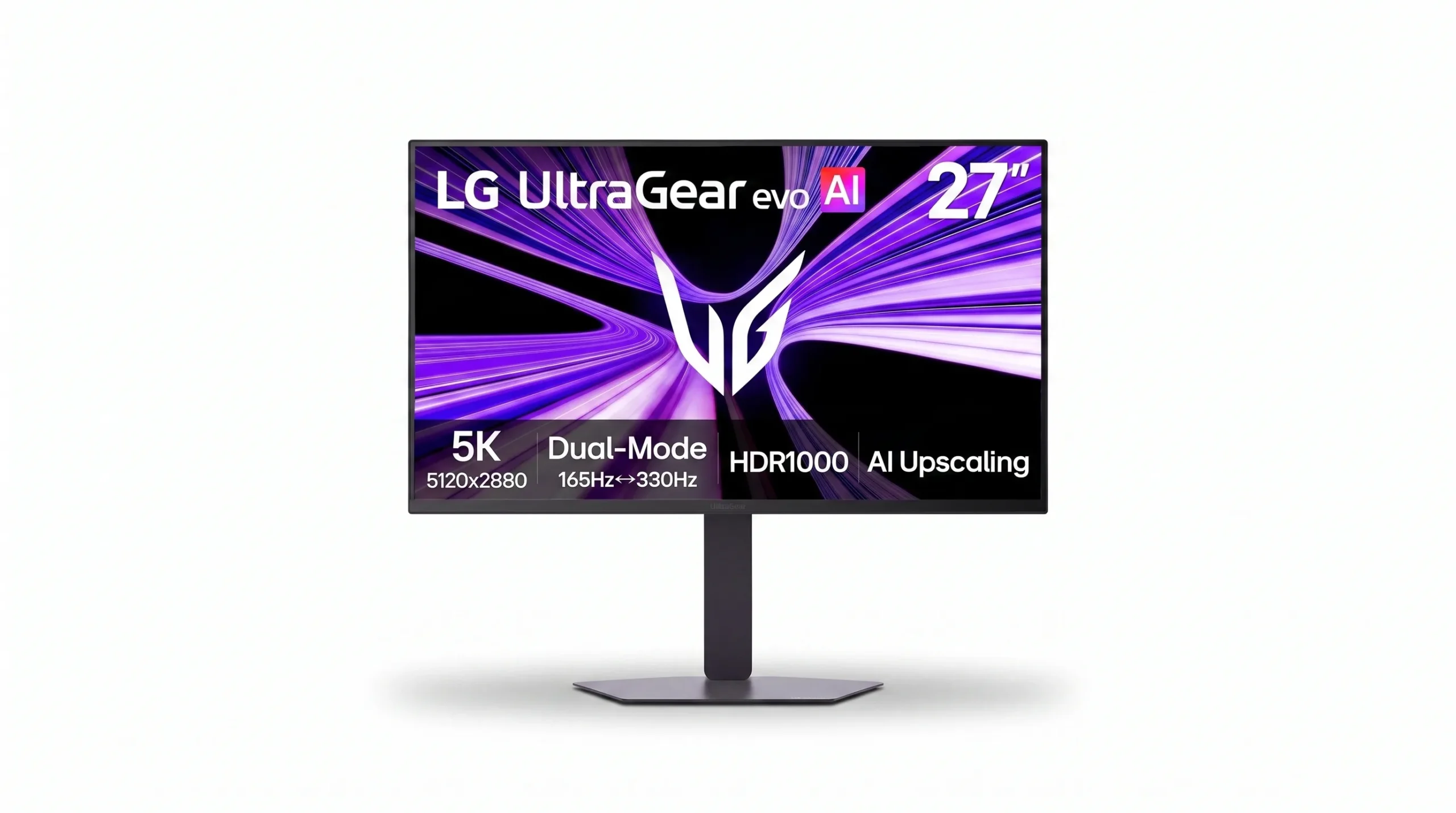
The LG 27GM950B-B is the unusual option in this lineup. Instead of following the common 1440p or 4K path, it pushes to 5K resolution while retaining a gaming-oriented 165Hz mode. That makes it particularly interesting for users who want extremely dense desktop detail without giving up serious gaming features.
LG's official page lists 27-inch 5K resolution, Hyper Mini LED with 9,216 LEDs, 5K at 165Hz or a 330Hz QHD dual-mode option, DisplayHDR1000, AI upscaling, 1ms GtG, DisplayPort 2.1, HDMI 2.1, and USB-C with 90W power delivery. citeturn0search9
The downside is value. A display this specialized is harder to justify if your main goal is simply competitive gaming. It also makes more sense for a high-end PC that can take advantage of the resolution. The supplied marketplace listing showed a lower user rating than the other models, with only a small review count, so buyers should examine current reviews before purchasing.
Key Specifications
| Specification | Details |
|---|---|
| Display | 27-inch IPS with Hyper Mini LED |
| Resolution | 5120 × 2880 (5K) |
| Refresh Rate | 5K 165Hz; dual mode up to 330Hz at QHD speed |
| HDR | DisplayHDR1000 |
| Response | 1ms GtG |
| Sync | NVIDIA G-SYNC / AMD FreeSync Premium |
| Ports | DisplayPort 2.1, HDMI 2.1, USB-C 90W |
| Special Features | AI upscaling and AI sound |
How It Performs in Real-World Use
The appeal is not just gaming. A 5K 27-inch screen can make fine UI elements, photos, design work, and high-resolution content look extremely crisp. The Mini-LED backlight and DisplayHDR1000 support also push it beyond ordinary IPS gaming monitors for HDR-oriented use. LG specifically highlights the high LED count, dual-mode refresh rates, and next-generation connectivity. citeturn0search9
Who Should Buy It?
- High-end PC owners who want 5K detail.
- Creators who also game.
- Users who want one premium desktop display.
- Buyers interested in dual-mode high refresh operation.
Who Should Avoid It?
- Budget-focused gamers.
- Players who mainly care about esports frame rates.
- Users whose GPU is not suited to 5K gaming.
- Buyers who simply want the best price-to-performance ratio.
Pros
- Very high 5K pixel density
- 165Hz at 5K
- 330Hz QHD dual mode
- DisplayHDR1000
- DP 2.1, HDMI 2.1 and USB-C
Cons
- Specialized and expensive
- 5K gaming needs substantial GPU power
- Less compelling for esports-only buyers
- Small marketplace review sample in the supplied listing
- Not the simplest value recommendation
Overall
The 27GM950B-B is the best alternative for buyers who want something more unusual than a standard 4K gaming monitor. Its combination of 5K, Mini-LED, HDR1000, and high refresh is impressive, but the premium only makes sense for a specific audience.
Dell 27 240Hz Gaming Monitor — SE2726HG

If your definition of a great gaming monitor starts with refresh rate, the Dell SE2726HG is the budget pick to watch. It pairs a 27-inch FHD IPS panel with 240Hz, making it especially attractive for competitive gaming where frame rate and motion clarity matter more than resolution.
Dell's official specifications list 1920×1080 at up to 240Hz, IPS technology, 0.5ms GtG in Extreme mode, 1,000:1 typical contrast, 300 cd/m² brightness, 99% sRGB, AMD FreeSync Premium, two HDMI inputs, and DisplayPort 1.4. Dell's current US product page also says the model is currently unavailable, so availability should be checked before publishing a live buying recommendation. citeturn2search2turn2search23
At 27 inches, 1080p is less pixel-dense than the Dell S2725DSM. But that is precisely why it can be easier to drive at very high frame rates. For fast competitive games, that can be a better trade than paying for 1440p or 4K that your GPU cannot fully exploit.
Key Specifications
| Specification | Details |
|---|---|
| Display | 27-inch IPS, 16:9 |
| Resolution | 1920 × 1080 (FHD) |
| Refresh Rate | 240Hz |
| Response | 0.5ms GtG Extreme mode |
| Adaptive Sync | AMD FreeSync Premium |
| Color | 99% sRGB |
| Ports | 2× HDMI, DisplayPort 1.4 |
| Stand | Tilt adjustment; VESA 100×100 |
How It Performs in Real-World Use
240Hz can be a meaningful upgrade for players who can actually produce high frame rates. The benefit is most relevant in fast shooters, racing games, and esports titles. For browsing, office work, and video, the extra refresh rate is pleasant but much less important than resolution and ergonomics.
Who Should Buy It?
- Competitive PC gamers.
- Players with GPUs aimed at high-FPS 1080p gaming.
- Buyers who want 240Hz without OLED pricing.
- Users who prefer 27 inches over a compact 24-inch display.
Who Should Avoid It?
- Users prioritizing sharp text and high pixel density.
- Gamers who mainly play cinematic single-player games.
- Buyers wanting 4K or QHD resolution.
- Anyone who needs height adjustment from the standard stand.
Pros
- 240Hz refresh rate
- Fast IPS response modes
- 99% sRGB
- FreeSync Premium
- Two HDMI inputs
Cons
- Only 1080p at 27 inches
- Basic tilt-only stand
- No premium HDR experience
- Not ideal for high-resolution productivity
- Current Dell page shows limited availability/unavailable status
Overall
The SE2726HG is a strong budget 240Hz gaming monitor concept: prioritize speed, keep resolution at 1080p, and avoid paying for features competitive players may not need. The current availability warning is the biggest practical issue, so verify stock before directing readers to purchase.
Product Comparison: Which Gaming Monitor Wins?
| Monitor | Best For | Key Advantage | Main Trade-Off |
|---|---|---|---|
| Dell S2725DSM | Most buyers | 27-inch QHD 144Hz balance | No OLED or 240Hz |
| MSI MPG 322URX | Premium gaming | 4K 240Hz QD-OLED | Very expensive |
| LG 24G414B-B | Budget gaming | 24-inch 1080p 144Hz | Lower resolution |
| LG 27GM950B-B | High-resolution hybrid use | 5K 165Hz Mini-LED | Specialized and costly |
| Dell SE2726HG | Competitive gaming | 27-inch 240Hz IPS | 1080p at 27 inches |
The key decision is not simply “which monitor is fastest?” It is “which specification matters most for the way I use my PC?” The MSI wins the premium performance contest, while the Dell S2725DSM is the more sensible all-rounder. The two 1080p models make sense when high frame rates and affordability matter more than pixel density.
Buyer Decision Table
| Buyer Goal | Recommended Model | Why |
|---|---|---|
| Best overall gaming monitor | Dell S2725DSM | QHD, 144Hz, adjustable stand and everyday versatility |
| Best 4K gaming monitor | MSI MPG 322URX | 4K 240Hz QD-OLED with modern connectivity |
| Best budget gaming monitor | LG 24G414B-B | 144Hz IPS with adaptive sync at a lower entry point |
| Best high-resolution alternative | LG 27GM950B-B | 5K, Mini-LED, HDR1000 and high refresh |
| Best 240Hz budget option | Dell SE2726HG | 240Hz IPS and 1080p performance focus |
🛒 Should You Buy?
| Grab These If… | Skip These If… |
|---|---|
| You want a balanced 1440p screen → Dell S2725DSM | You need 240Hz esports performance → choose a high-refresh model |
| You want 4K OLED → MSI MPG 322URX | You have a modest GPU → 4K 240Hz may be unnecessary |
| You want affordable 144Hz → LG 24G414B-B | You need a large high-resolution workspace |
| You want 5K + Mini-LED → LG 27GM950B-B | You mainly care about low-cost competitive gaming |
| You want 240Hz on a budget → Dell SE2726HG | You prioritize 1440p/4K sharpness over frame rate |
| You want one monitor for work and gaming → Dell S2725DSM | You need USB-C docking and a broad I/O hub |
Our Research-Based Comparison
This comparison weighs manufacturer specifications, display technology, refresh rate, resolution, adaptive-sync support, connectivity, ergonomics, intended use, and value. Official manufacturer information was prioritized for the technical specifications. The marketplace prices, ratings, and “bought” counts supplied with the source material are treated as time-sensitive snapshots rather than permanent facts.
We did not treat any model as personally tested. That matters because response time, HDR behavior, uniformity, motion handling, and OLED characteristics can vary in real use and should be validated through independent testing when those details are important to your purchase.
Price & Value
The supplied listing snapshots put the Dell S2725DSM at $189.99, the MSI MPG 322URX at $929.99, the LG 24G414B-B at $109.99, the LG 27GM950B-B at $899.99, and the Dell SE2726HG at $109.99. Treat these as source-provided price snapshots, not guaranteed current prices. Retail prices and promotions can change quickly.
For most buyers, the Dell S2725DSM has the strongest value proposition because QHD at 144Hz is a broadly useful combination. The LG 24G414B-B is the cheaper route into high-refresh gaming, while the Dell SE2726HG makes more sense if you specifically want 240Hz. The MSI is worth paying extra for only when you can exploit 4K 240Hz and want OLED contrast. The LG 27GM950B-B is the specialist purchase: expensive, unusual, and compelling mainly for buyers who specifically want 5K and Mini-LED.
Best Alternatives
- A 27-inch 1440p 165Hz IPS monitor: Consider this if you like the S2725DSM concept but want more refresh-rate headroom.
- A 27-inch 1440p OLED gaming monitor: Better suited to buyers who want OLED contrast without moving all the way to 4K 240Hz.
- A 32-inch 4K IPS gaming monitor: A practical alternative to the MSI if OLED is not important and you want to reduce cost.
- A 24-inch 1080p 180Hz-class monitor: Worth considering for esports-focused buyers who want high refresh at a budget price.
Because exact model availability varies by market, verify the specific alternative, panel type, refresh rate, warranty, and current price before publication.
Buying Guide: What to Look for in a Gaming Monitor
1. Choose the right resolution
1080p is still useful for affordable competitive gaming. QHD is a strong middle ground for 27-inch PC gaming. 4K is best suited to buyers with powerful hardware and a preference for sharpness. 5K is a specialist option for users who want exceptional desktop detail as well as gaming.
2. Match refresh rate to your games
144Hz is a major step above 60Hz for motion-heavy gaming and general desktop use. 240Hz is more relevant to competitive players who can sustain high frame rates. Beyond that, the benefit becomes increasingly dependent on the game, GPU, and player's priorities.
3. Understand panel technology
IPS is a strong all-rounder with good viewing angles and broad usability. QD-OLED provides extremely high contrast and fast response characteristics, but buyers should follow the manufacturer's OLED-care recommendations. Mini-LED can deliver strong HDR brightness and contrast while retaining an LCD foundation.
4. Check your GPU and ports
Do not buy a 4K 240Hz monitor simply because the specification looks impressive. Check whether your graphics card can actually drive the games you play at the target resolution and frame rate. For premium displays, HDMI 2.1 and DisplayPort 2.1 can matter for high-bandwidth modes.
5. Do not overlook ergonomics
Height, tilt, swivel, and pivot adjustment can have more day-to-day impact than a small difference in peak specifications. If the monitor will also be your work display, prioritize a comfortable stand.
6. Think about your desk size
A 24-inch monitor is compact and easy to position. A 27-inch model is a versatile desktop size. A 32-inch 4K screen gives you a larger canvas but needs more desk depth and viewing distance.
7. Check warranty and availability
Warranty coverage matters, especially for expensive OLED displays. MSI specifically lists a three-year warranty including burn-in coverage for the MPG 322URX. citeturn0search0turn0search1
FAQ: Best Gaming Monitors 2026
Which is the best gaming monitor overall?
The Dell S2725DSM is the best overall choice in this comparison because 27-inch QHD at 144Hz is a strong balance for gaming, work, and everyday use without the cost of the premium models.
Which is the best 240Hz gaming monitor here?
The MSI MPG 322URX is the most advanced 240Hz option because it combines 4K with QD-OLED. For a lower-cost 240Hz approach, the Dell SE2726HG is the more budget-focused choice.
Is 1440p better than 1080p for gaming?
Not automatically. 1440p gives you a sharper image and larger workspace, while 1080p is easier to drive at very high frame rates. Competitive players may prefer 1080p; general PC users often benefit from QHD.
Is a 4K 240Hz monitor worth it?
It can be, if you have a high-end GPU and actually play games that can take advantage of both 4K resolution and very high frame rates. Otherwise, a QHD 144Hz or 165Hz monitor can offer better value.
Is OLED better than IPS for gaming?
OLED can provide dramatically deeper blacks and very fast pixel response, while IPS remains a versatile choice for mixed use. OLED buyers should also consider the manufacturer's pixel-care and burn-in guidance.
Is 240Hz worth it over 144Hz?
For competitive gaming at high frame rates, 240Hz can be worthwhile. For casual gaming, productivity, and cinematic titles, 144Hz is often enough and may leave more budget for resolution or panel quality.
What size gaming monitor is best?
24 inches works well for compact 1080p esports setups, 27 inches is the most versatile size for 1440p, and 32 inches is attractive for immersive 4K gaming.
Should I buy a 5K gaming monitor?
Only if you specifically value very high desktop pixel density and want a premium display that can also game at high refresh rates. It is not the obvious choice for a budget or esports-first setup.
Final Verdict
If I were helping a friend choose one of these today, I would start with the Dell S2725DSM. It has the resolution, refresh rate, size, ergonomics, and everyday flexibility that make sense for the widest range of PC buyers. If the budget is tight, the LG 24G414B-B is the safer value move. If competitive gaming is the priority, the Dell SE2726HG's 240Hz focus becomes more attractive. And if money is secondary to image quality, the MSI MPG 322URX is the standout premium choice.
The LG 27GM950B-B is the wildcard. It is arguably the most specialized monitor here, and that is both its strength and its weakness. For the right buyer, 5K plus Mini-LED and high refresh is compelling. For everyone else, the simpler QHD or 4K options are easier to justify.
Final Buyer Summary
| Buyer Type | Recommended Product | Why |
|---|---|---|
| Best Overall | Dell S2725DSM | Best mix of QHD clarity, 144Hz speed and usability |
| Best Value | LG 24G414B-B | Affordable 1080p 144Hz gaming |
| Premium Buyer | MSI MPG 322URX | 4K 240Hz QD-OLED and modern connectivity |
| Budget 240Hz Buyer | Dell SE2726HG | Fast IPS gaming without OLED pricing |
| Best for High-Resolution Hybrid Use | LG 27GM950B-B | 5K detail, Mini-LED HDR and high refresh |
| Best for Everyday Use | Dell S2725DSM | Balanced size, resolution, refresh and ergonomics |
Affiliate Disclosure
This article may contain affiliate links. If you purchase a product through one of these links, we may earn a commission at no additional cost to you. Our recommendations are based on product research, specifications, features, value, and buyer usefulness—not on the commission we may receive.