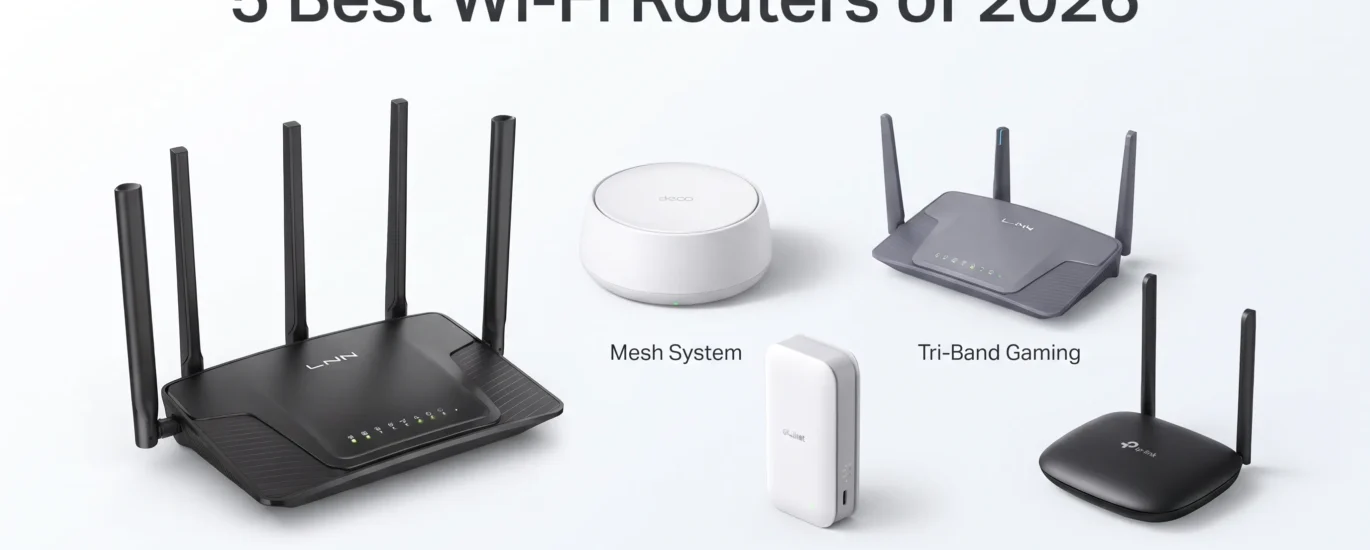
5 Best Wi-Fi Routers in 2026 — Which One Is Worth Buying?
Choosing a Wi-Fi router is no longer just about buying the model with the biggest number on the box. Wi-Fi generation, coverage, wired ports, portability, VPN support, cellular connectivity, and the number of devices in your home can all change which router makes sense.
The five routers in this guide are aimed at very different buyers. One is built for travel, another is a straightforward low-cost home router, while the TP-Link Deco 7 BE23 focuses on whole-home mesh coverage. The GL.iNet Flint 3e takes a more performance-focused approach, and the GL-XE3000 Puli AX adds 5G and battery-powered networking.
Rather than treating every router as if it solves the same problem, this comparison looks at what each model is actually designed to do, where its feature set makes sense, and where another option may be a better fit.

GL.iNet GL-XE3000 Puli AX 5G Router
Quick Verdict
The Puli AX is designed for users who need flexible connectivity rather than simply maximum home coverage. Its cellular-focused design makes it particularly relevant for remote work, temporary offices, events, retail environments, and other situations where dependable wired broadband may not be the only option.
Product Overview
The GL.iNet GL-XE3000 Puli AX combines a 5G cellular connection with Wi-Fi 6 networking in a portable-oriented package. The supplied specifications list dual SIM support, Multi-WAN, VPN functionality, and a 6400mAh battery. On the wireless side, it can deliver up to 574Mbps on 2.4GHz and 2402Mbps on 5GHz under the stated specifications. That makes this a very different proposition from a conventional fixed-location router. Instead of being tied entirely to one broadband connection, the Puli AX is intended for situations where cellular connectivity can play a central role.
Key Features
- 5G Cellular Connectivity — Gives the router access to compatible cellular networks, which can be useful for remote locations or backup connectivity.
- 6400mAh Battery — A built-in battery gives the router more flexibility than a standard plug-in home router.
- Dual SIM Support — The dual-SIM design can be useful for users who need additional cellular flexibility.
Specifications
| Specification | Details |
|---|---|
| Model | GL-XE3000 Puli AX |
| Cellular | 5G NR |
| Wi-Fi | Wi-Fi 6 |
| 2.4GHz Speed | Up to 574Mbps |
| 5GHz Speed | Up to 2402Mbps |
| SIM | Dual SIM |
| Battery | 6400mAh |
| Networking | Multi-WAN and VPN support |
How It Performs in Real-World Use
Based on the supplied feature set, this router makes the most sense when flexibility matters. A remote worker who moves between locations, an event organizer needing temporary connectivity, or a small business looking for a cellular networking option may find the feature mix more useful than the simpler designs in this list.
The important distinction is that its value is not simply about Wi-Fi speed. The 5G connection, battery, dual-SIM support, and Multi-WAN capabilities are what make the Puli AX stand out.
Design & Build
The supplied information points toward a portable networking design built around cellular connectivity and battery operation. That makes its overall purpose quite different from a router intended to sit permanently beside a modem.
Ease of Use
Its connectivity options are designed for users who need more flexibility than a basic home router provides. However, buyers should pay attention to cellular compatibility and their intended network setup before purchasing.
Who Should Buy It?
- Remote workers who need flexible internet access.
- Users who want 5G connectivity in a portable networking device.
- Businesses running temporary offices or events.
- Users who value dual-SIM and Multi-WAN functionality.
Who Should Avoid It?
- Buyers who only need a simple home Wi-Fi router.
- Anyone who does not need cellular connectivity.
- Budget-focused buyers looking for basic Wi-Fi networking.
Pros
- 5G cellular connectivity
- Wi-Fi 6 wireless networking
- 6400mAh battery
- Dual SIM support
- Multi-WAN and VPN features
Cons
- More specialized than a normal home router
- Higher purchase price
- Cellular compatibility needs checking
- May be unnecessary for fixed broadband users
- Its value depends heavily on the use case
Value for Money
$409.99
At the supplied price, this is clearly positioned above ordinary home routers. The justification comes from the combination of 5G networking, battery power, dual SIM, Multi-WAN, and VPN support. For a buyer who needs those capabilities, the feature set is substantially different from a basic router. For ordinary home broadband, however, a less specialized model can make more sense.
Overall
The GL-XE3000 Puli AX is a niche but capable networking option. Its biggest strength is flexibility, while its biggest drawback is that many home users will not need its cellular-focused feature set. It makes the most sense for buyers who specifically need 5G and portable connectivity.
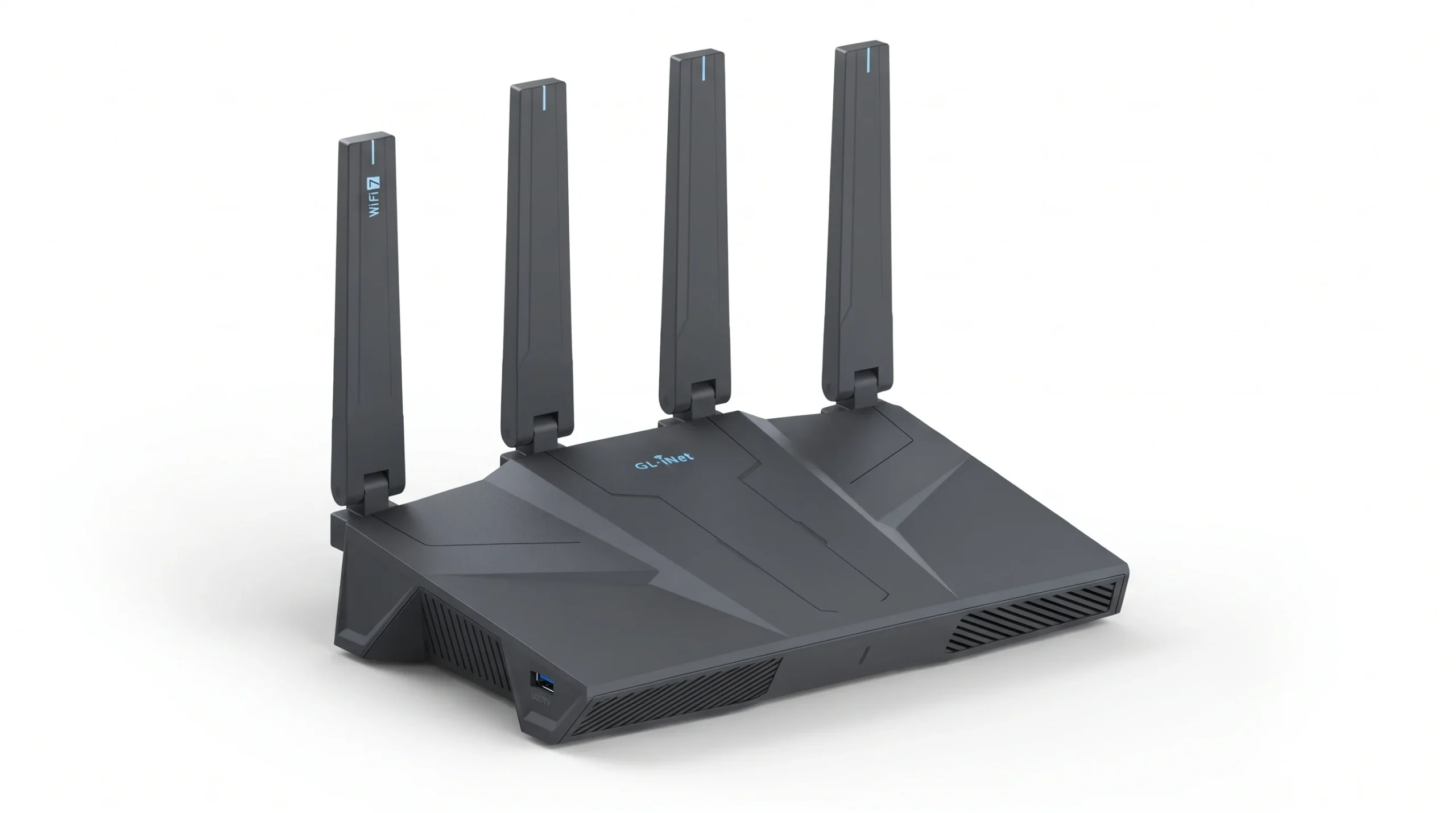
GL.iNet GL-BE6500 Flint 3e Wi-Fi 7 Router
Quick Verdict
With Wi-Fi 7, MLO, 4K-QAM, and advertised VPN speeds of up to 1100Mbps for WireGuard and OpenVPN, the Flint 3e is built around performance and network flexibility. Its stated coverage of up to 2,500 square feet also makes it more suitable for a larger home or workspace than a compact travel router.
Product Overview
The GL.iNet Flint 3e brings Wi-Fi 7 into a traditional home-router format. Its headline wireless class is BE6500, with support for Multi-Link Operation and 4K-QAM. Those technologies are aimed at improving the way compatible devices use modern Wi-Fi connections. The supplied information also highlights VPN performance, with both WireGuard and OpenVPN listed at up to 1100Mbps under the stated conditions.
That combination makes this model especially relevant to users who care about both wireless performance and control over their network traffic.
Key Features
- Wi-Fi 7 — The newer wireless standard gives compatible devices access to modern Wi-Fi capabilities.
- VPN Performance — WireGuard and OpenVPN are listed at up to 1100Mbps, although actual results depend on network and VPN conditions.
- Up to 2,500 Sq. Ft. Coverage — The stated coverage makes it more appropriate for larger spaces than small travel-oriented routers.
Specifications
| Specification | Details |
|---|---|
| Model | GL-BE6500 Flint 3e |
| Wi-Fi Standard | Wi-Fi 7 |
| Wireless Class | BE6500 |
| Key Technologies | MLO and 4K-QAM |
| VPN | WireGuard and OpenVPN |
| VPN Speed | Up to 1100Mbps stated |
| Coverage | Up to 2,500 sq. ft. stated |
How It Performs in Real-World Use
For buyers with compatible Wi-Fi 7 devices, the Flint 3e is positioned as a high-performance home networking solution. Gamers, streamers, and remote workers can also benefit from having a router designed around modern wireless connectivity rather than an older Wi-Fi generation.
The VPN capability is particularly notable. It gives this router a different appeal from models that focus almost entirely on coverage and basic connectivity.
Design & Build
The Flint 3e is a dedicated home router rather than a portable travel model. Its stated coverage and networking capabilities suggest that it is intended to remain in a fixed location and serve multiple devices.
Ease of Use
The core appeal is flexibility. However, buyers should remember that the stated VPN speeds depend on factors such as the ISP, network environment, VPN server location, and VPN provider.
Who Should Buy It?
- Gamers who want a modern Wi-Fi 7 router.
- Remote workers who use VPN connections regularly.
- Homes with newer Wi-Fi 7-compatible devices.
- Users who want more networking control.
Who Should Avoid It?
- Buyers with very basic networking needs.
- Small spaces where advanced coverage is unnecessary.
- Users whose devices do not benefit from newer Wi-Fi standards.
Pros
- Wi-Fi 7 support
- Strong VPN feature set
- MLO and 4K-QAM
- Stated 2,500 sq. ft. coverage
- Good fit for gaming and remote work
Cons
- Advanced features may be unnecessary for basic users
- Wi-Fi 7 benefits depend on compatible devices
- Actual VPN speeds can vary
- Not designed primarily for travel
- Higher cost than basic Wi-Fi 6 routers
Value for Money
$179.99
At the supplied price, the Flint 3e sits in an interesting middle ground. It costs considerably less than the specialized 5G Puli AX while offering a much more advanced feature set than a basic budget router. Buyers who actually need Wi-Fi 7 and VPN performance can get meaningful value from those features.
Overall
The Flint 3e is a strong choice for buyers who want modern wireless technology without moving into cellular-router territory. Its standout advantage is the combination of Wi-Fi 7 and VPN capability. The main reason to skip it is simply that basic users may not need all that networking flexibility.
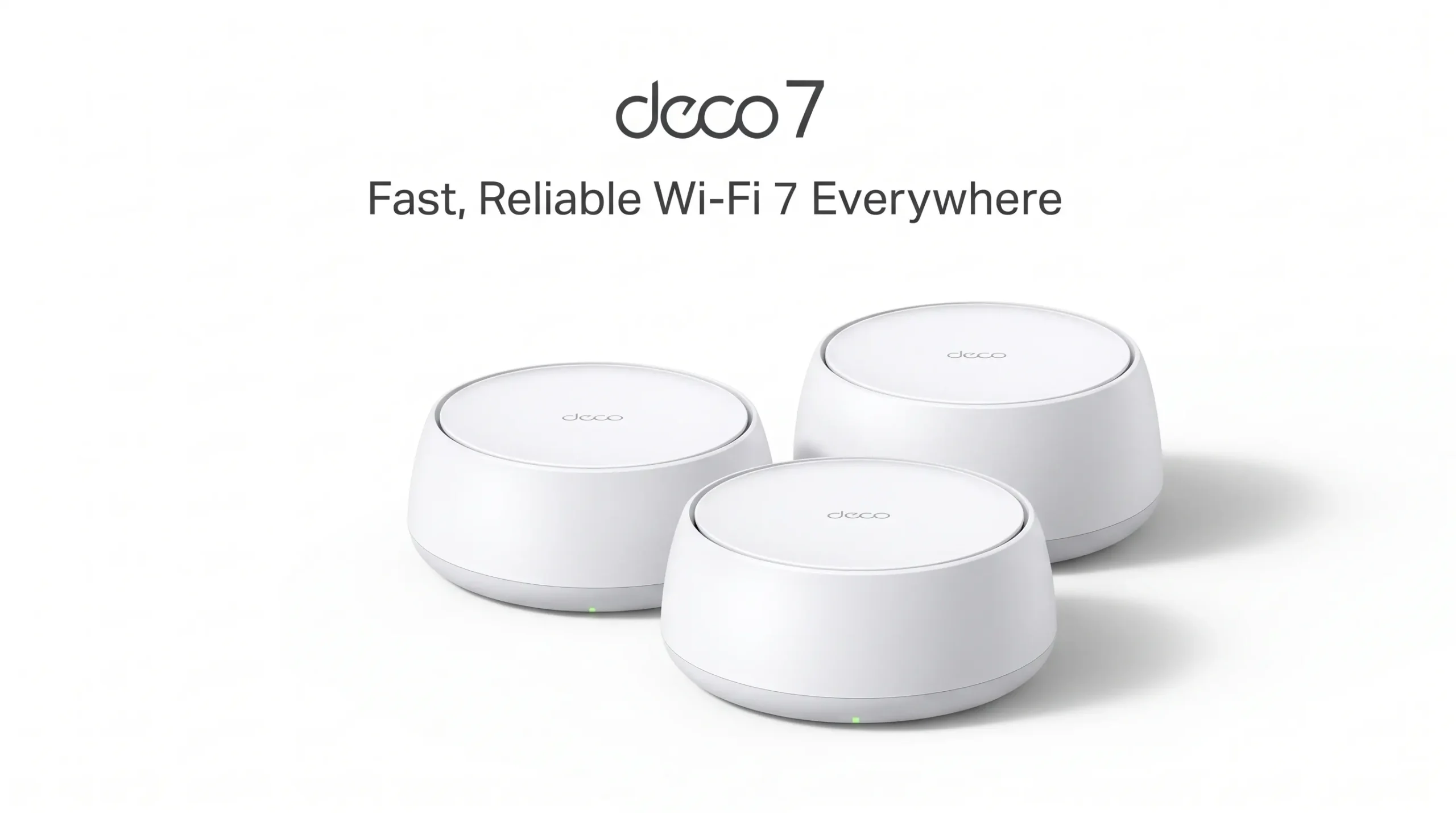
TP-Link Deco 7 BE23 Dual-Band BE3600 Wi-Fi 7 Mesh System
Quick Verdict
The Deco 7 BE23 is the natural fit for buyers who need broad Wi-Fi coverage rather than a single router sitting in one room. Its Wi-Fi 7 technology, two 2.5Gbps ports per unit, MLO, and three-node configuration make it especially interesting for large homes with multiple connected devices.
Product Overview
The TP-Link Deco 7 BE23 is a three-pack Wi-Fi 7 mesh system built around dual-band BE3600 networking. The supplied information lists up to 2882Mbps on the 5GHz band and 688Mbps on 2.4GHz, along with Multi-Link Operation, Multi-RUs, and 4K-QAM.
The bigger story, however, is coverage. A three-pack is stated to cover up to 6,500 square feet and support up to 150 devices. That makes this system much more appropriate for larger properties than a compact standalone router.
Key Features
- 6,500 Sq. Ft. Mesh Coverage — The three-pack is designed to extend Wi-Fi across a much larger area.
- Wi-Fi 7 with MLO — Modern Wi-Fi features can help compatible devices take advantage of the newer standard.
- Dual 2.5Gbps Ports Per Unit — Useful for multi-gig wired networking and high-performance wired devices.
Specifications
| Specification | Details |
|---|---|
| Model | Deco 7 BE23 |
| Wi-Fi | Wi-Fi 7 |
| Wireless Class | BE3600 |
| 5GHz Speed | Up to 2882Mbps |
| 2.4GHz Speed | Up to 688Mbps |
| Coverage | Up to 6,500 sq. ft. with 3-pack |
| Device Capacity | Up to 150 devices stated |
| Ports | Two 2.5Gbps WAN/LAN ports per unit |
How It Performs in Real-World Use
Mesh networking becomes useful when one router cannot reliably reach every part of a property. Instead of expecting one unit to push the signal through the entire house, the Deco system uses multiple nodes to create broader coverage.
For a large family home, multi-floor property, or workspace with many connected devices, that approach can be more practical than simply buying a faster single router and placing it in the same location.
Design & Build
The three-unit configuration is the key design characteristic. Each node can participate in the mesh network, while the 2.5Gbps WAN/LAN ports give buyers the option of using faster wired connections where supported.
Ease of Use
A mesh system naturally requires more planning than a single router because node placement matters. Buyers should consider where coverage gaps exist before deciding where each unit should be installed.
Who Should Buy It?
- Owners of large homes.
- Users dealing with Wi-Fi dead zones.
- Families with many connected devices.
- Gamers and remote workers who need broad coverage.
Who Should Avoid It?
- People living in small apartments with simple Wi-Fi needs.
- Buyers who only need one inexpensive router.
- Users who have no need for mesh coverage.
Pros
- Three-node Wi-Fi 7 mesh system
- Up to 6,500 sq. ft. stated coverage
- Supports up to 150 devices
- Two 2.5Gbps ports per unit
- MLO and 4K-QAM support
Cons
- Three-pack may be excessive for small homes
- Requires more careful placement than one router
- Wi-Fi 7 benefits depend on compatible devices
- Higher upfront cost than budget routers
- Not the most compact solution
Value for Money
$219.99
The supplied price makes the three-pack particularly relevant to buyers who actually need whole-home coverage. Compared with buying a single budget router, the cost is obviously higher, but the product is solving a different problem. If your current router already covers your home well, spending extra on a mesh system may not provide much practical benefit.
Overall
The Deco 7 BE23 is built around coverage and capacity rather than portability. Its biggest advantage is the three-node Wi-Fi 7 design and broad stated coverage. The trade-off is that smaller homes may not need a system this extensive.
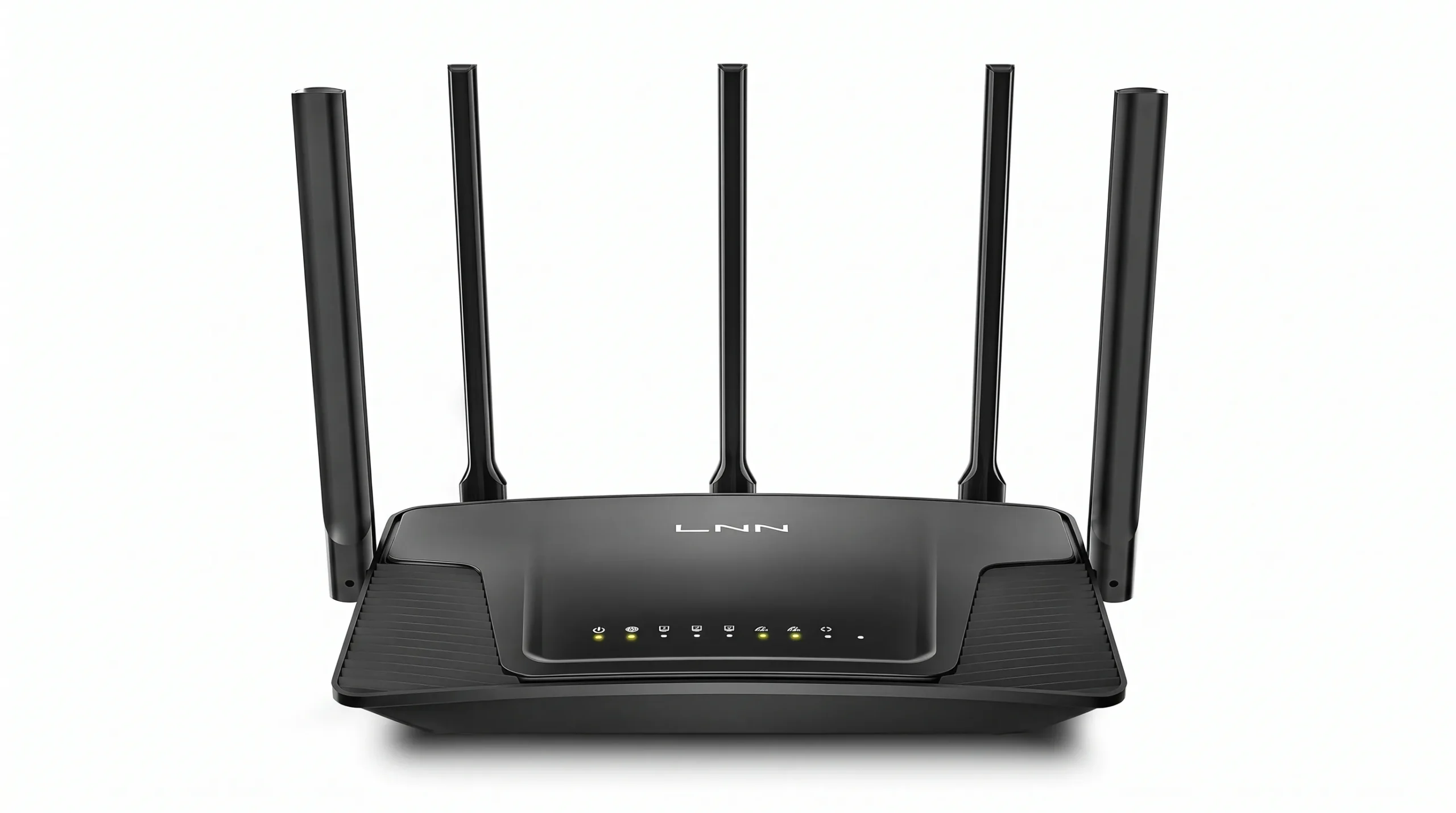
LNN-AX3000 Wi-Fi 6 Router
Quick Verdict
This router is aimed at buyers who do not want to spend heavily on advanced networking features. Its stated AX3000-class wireless performance and simple setup make it suitable for everyday home use, provided your requirements do not extend into mesh coverage, 5G connectivity, or advanced Wi-Fi 7 features.
Product Overview
The LNN-AX3000 is a dual-band Wi-Fi 6 router from FWOOPS. The supplied information lists up to 2402Mbps on the 5GHz band and 574Mbps on 2.4GHz. It is described as supporting more than 20 devices and using five antennas.
Its biggest advantage is simplicity. Many households do not need a complicated networking system. If your goal is simply to connect phones, laptops, smart-home products, streaming devices, and other everyday equipment, a basic Wi-Fi 6 router can be a more sensible starting point.
Key Features
- Wi-Fi 6 — Provides a modern wireless standard for everyday home connectivity.
- AX3000-Class Performance — The stated wireless rates reach 2402Mbps on 5GHz and 574Mbps on 2.4GHz.
- No App Required — The supplied product information specifically highlights setup without requiring a dedicated app.
Specifications
| Specification | Details |
|---|---|
| Brand | FWOOPS |
| Model | LNN-AX3000 |
| Wi-Fi | Wi-Fi 6 |
| 5GHz Speed | Up to 2402Mbps |
| 2.4GHz Speed | Up to 574Mbps |
| Device Support | 20+ devices stated |
| Antennas | 5 antennas stated |
| Setup | 5-step setup; no app required |
How It Performs in Real-World Use
The feature set is aimed squarely at normal household activities. Streaming, browsing, video calls, online classes, and smart-home connectivity are the types of workloads the supplied information specifically highlights.
That makes the LNN-AX3000 less about chasing the newest networking technology and more about meeting ordinary needs without a large purchase. For many buyers, that distinction matters more than having Wi-Fi 7 on the box.
Design & Build
The supplied specifications identify five antennas and a conventional dual-band router design. Detailed material information was not provided, so there is no reason to make additional claims about construction beyond the supplied information.
Ease of Use
The product is specifically marketed as requiring no app and offering a five-step setup. That should appeal to buyers who want a conventional networking setup without adding another mobile application to the process.
Who Should Buy It?
- Budget-conscious households.
- Users who need Wi-Fi 6 for everyday activities.
- Students and remote workers with ordinary connectivity needs.
- Homes with several phones, laptops, and smart devices.
Who Should Avoid It?
- Large homes that need a mesh system.
- Users specifically looking for Wi-Fi 7.
- Buyers who need 5G cellular connectivity.
- Power users looking for advanced networking features.
Pros
- Low purchase price
- Wi-Fi 6 support
- AX3000-class wireless speeds
- No app required
- Designed for everyday home use
Cons
- Less advanced than the Wi-Fi 7 models
- Not a mesh system
- No 5G cellular connectivity listed
- Limited supplied information about advanced controls
- May not suit demanding networking environments
Value for Money
$49.99
This is where the LNN-AX3000 becomes particularly interesting. At the supplied price, it targets buyers who want functional Wi-Fi without paying for features they may never use. If your home is relatively straightforward and you mainly need reliable wireless access for everyday devices, spending several times more on a premium router may not be necessary.
Overall
The LNN-AX3000 keeps the proposition simple: Wi-Fi 6, dual-band connectivity, and a low entry price. Its biggest weakness is the lack of the more specialized capabilities found elsewhere in this list. For basic home networking, though, that may not be a weakness at all.
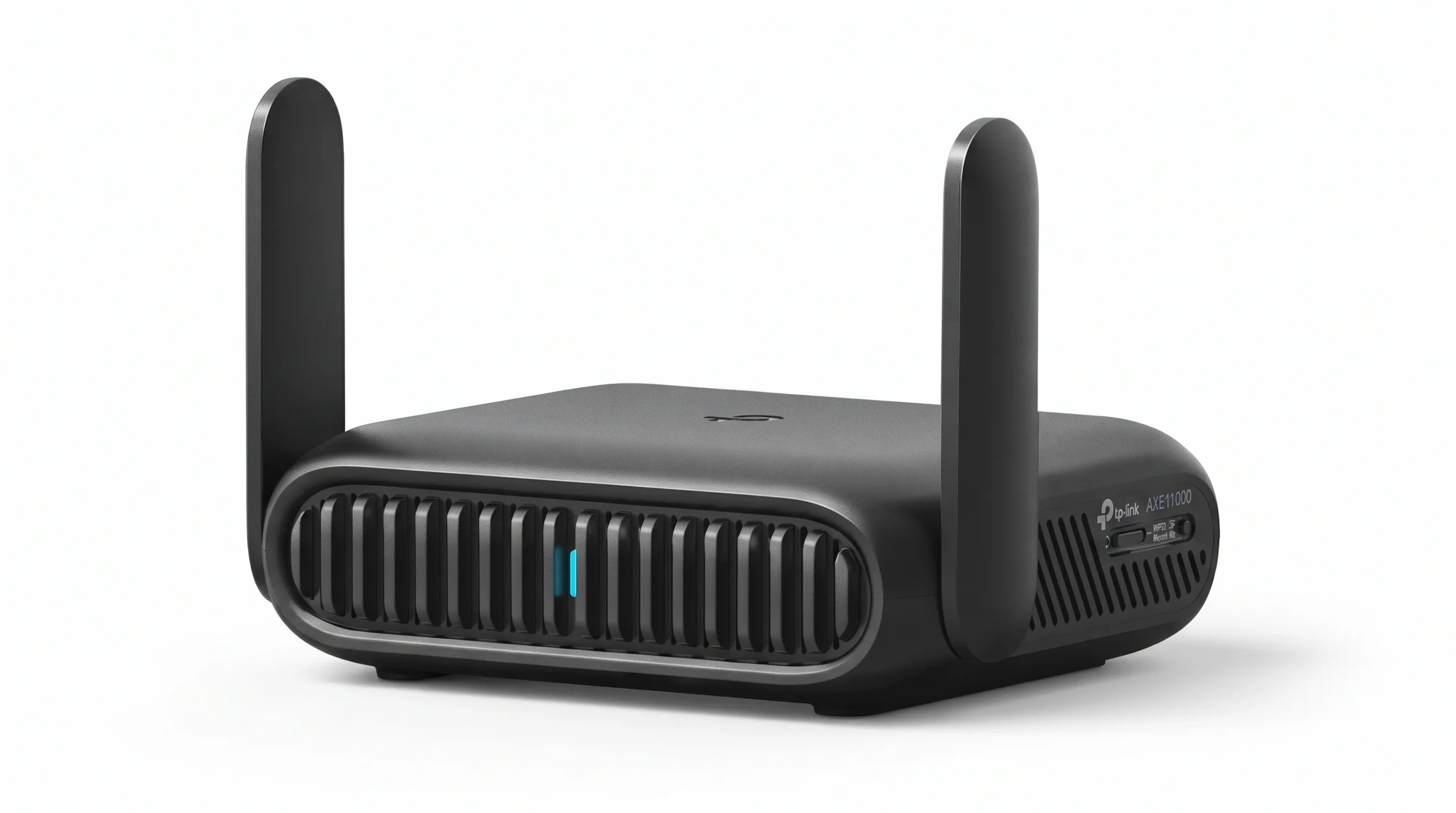
Roam 7 BE3600 Wi-Fi 7 Portable Travel Router
Quick Verdict
If you frequently use hotel, Airbnb, airport, cruise, RV, or other public Wi-Fi networks, the Roam 7's ability to create a private network can be genuinely useful. It also supports Wi-Fi 7 and can handle up to 90 devices according to the supplied information, although it does not support the 6GHz band.
Product Overview
The Roam 7 BE3600 is a portable dual-band Wi-Fi 7 travel router designed around flexibility. Rather than replacing a large home mesh system, it is intended to travel with you and turn public Wi-Fi into a private network for your devices.
The supplied specifications list speeds of up to 2882Mbps on 5GHz and 688Mbps on 2.4GHz. It also includes a 2.5G port, USB 3.0, OpenVPN and WireGuard support, and support for up to 90 devices. One important limitation is clearly stated: this model does not support the 6GHz band.
Key Features
- Private Network Anywhere — The router can connect to public Wi-Fi and create a private network for your devices.
- Wi-Fi 7 BE3600 — Provides modern dual-band Wi-Fi performance with up to 2882Mbps on 5GHz and 688Mbps on 2.4GHz.
- VPN Support — OpenVPN and WireGuard support adds useful flexibility for travelers and remote workers.
Specifications
| Specification | Details |
|---|---|
| Model | Roam 7 BE3600 / TL-WR3602BE |
| Wi-Fi | Wi-Fi 7, dual-band |
| 5GHz Speed | Up to 2882Mbps |
| 2.4GHz Speed | Up to 688Mbps |
| 6GHz | Not supported |
| Port | 2.5G port |
| USB | USB 3.0 |
| VPN | OpenVPN and WireGuard |
| Device Capacity | Up to 90 devices stated |
How It Performs in Real-World Use
Travel is where this router makes the most sense. Hotel and other public networks can be inconvenient when you have multiple devices to connect. A dedicated travel router gives you one networking point instead of repeatedly configuring every phone, laptop, tablet, or other device.
The private-network approach is also useful for remote work. Instead of connecting each device directly to public Wi-Fi, the router can sit between the public connection and your personal devices.
Design & Build
The portable travel-router format is the defining characteristic here. The 2.5G port and USB 3.0 connection add flexibility for users who need more than wireless networking while traveling.
Ease of Use
The multi-mode design gives the router a broader range of potential uses than a basic travel hotspot. Buyers should still remember that public Wi-Fi quality will ultimately affect the connection, regardless of the router's advertised wireless speed.
Who Should Buy It?
- Frequent travelers staying in hotels and Airbnbs.
- Remote workers who use public Wi-Fi.
- People traveling with several connected devices.
- Users who want WireGuard or OpenVPN support while traveling.
- Buyers who want a portable Wi-Fi 7 router.
Who Should Avoid It?
- Users looking for a large-home mesh system.
- People who specifically need 6GHz Wi-Fi.
- Buyers who only need a basic permanent home router.
Pros
- Portable Wi-Fi 7 design
- Private network creation on public Wi-Fi
- WireGuard and OpenVPN support
- 2.5G port and USB 3.0
- Supports up to 90 devices according to supplied data
Cons
- No 6GHz support
- Not intended to replace a large mesh system
- Public Wi-Fi quality remains a limiting factor
- Advanced features may be unnecessary for occasional travelers
- Not the cheapest basic home-router option
Value for Money
$89.98
At the supplied price, the Roam 7 occupies a useful middle ground. It costs more than a basic budget home router but offers a completely different feature set. The value becomes much easier to understand if you travel regularly and need one device to manage networking for several personal devices.
Overall
The Roam 7 is not trying to be the biggest home router here, and that is exactly why it stands out. Its strongest advantage is portability combined with private-network and VPN functionality. The lack of 6GHz support is an important limitation, but for travel-focused buyers, the overall feature combination is compelling.
Product Comparison
| Product | Best For | Key Feature | Main Advantage | Main Limitation |
|---|---|---|---|---|
| GL.iNet GL-XE3000 Puli AX | 5G and remote connectivity | 5G + 6400mAh battery | Flexible cellular networking | High price for basic home users |
| GL.iNet Flint 3e | Gaming, VPN and Wi-Fi 7 | Wi-Fi 7 + VPN | Advanced networking control | More than basic users need |
| TP-Link Deco 7 BE23 | Large homes | Three-node Wi-Fi 7 mesh | Broad stated coverage | Overkill for small spaces |
| FWOOPS LNN-AX3000 | Budget home use | Wi-Fi 6 AX3000 | Low purchase cost | Fewer advanced features |
| Roam 7 BE3600 | Travel | Private network + Wi-Fi 7 | Portable networking flexibility | No 6GHz support |
The easiest way to understand the difference is to look at the problem each router is trying to solve. The Roam 7 is about travel. The LNN-AX3000 is about affordability. The Deco 7 is about coverage. The Flint 3e is about advanced home networking and VPN use. The Puli AX is about cellular flexibility.
Which One Should You Choose?
| Buyer Type | Recommended Product | Why |
|---|---|---|
| Frequent traveler | Roam 7 BE3600 | Portable design, private-network capability and VPN support. |
| Budget buyer | FWOOPS LNN-AX3000 | Low price with Wi-Fi 6 and everyday home networking features. |
| Large-home owner | TP-Link Deco 7 BE23 | Three-node mesh system with up to 6,500 sq. ft. stated coverage. |
| Gaming/VPN user | GL.iNet Flint 3e | Wi-Fi 7 combined with WireGuard and OpenVPN support. |
| 5G connectivity user | GL.iNet GL-XE3000 Puli AX | 5G, dual SIM, battery and Multi-WAN capabilities. |
Price & Value
These five routers cover a surprisingly wide range of budgets and use cases. Based on the supplied prices, the LNN-AX3000 is the clear low-cost option at $49.99, while the Roam 7 sits at $89.98. The Flint 3e is listed at $179.99, and the Deco 7 three-pack is $219.99. The GL-XE3000 Puli AX is substantially more expensive at $409.99.
The important point is that these prices should not be compared without considering what each product is designed to do. A $49.99 home router and a $409.99 5G router are solving very different networking problems.
If you only need ordinary Wi-Fi, the cheaper options make more sense. If you need whole-home coverage, Wi-Fi 7, VPN functionality, travel networking, or cellular connectivity, paying more can be justified by the additional capabilities.
Pricing can change, so check the latest retailer price before buying.
Buying Guide: What to Look for in a Wi-Fi Router
1. Choose the Right Wi-Fi Generation
Wi-Fi 6 remains perfectly relevant for many everyday homes, while Wi-Fi 7 is designed for newer devices and modern wireless workloads. Do not automatically pay for Wi-Fi 7 unless your devices and internet setup can make use of it.
2. Think About Coverage First
A faster router does not automatically solve coverage problems. If your home has multiple floors, long distances, or dead zones, a mesh system such as the Deco 7 can be more appropriate than simply replacing one standalone router with another.
3. Check Your Wired Ports
If you have multi-gig internet or high-performance wired devices, Ethernet port speed matters. The Deco 7, for example, lists two 2.5Gbps WAN/LAN ports per unit.
4. Consider VPN Requirements
Remote workers and privacy-focused users should pay attention to VPN support. The Flint 3e and Roam 7 both list WireGuard and OpenVPN support, giving them a different appeal from simpler home routers.
5. Decide Whether You Need Cellular Internet
If your main connection needs to work through cellular networks, a 5G router is a completely different category. The Puli AX is built around that use case and adds dual SIM and battery features.
6. Count Your Devices
A modern household can have phones, laptops, TVs, cameras, smart speakers, tablets, consoles, and other connected products. Think about your actual device count instead of choosing a router based only on advertised maximum speeds.
7. Consider Portability
A large home router is not a substitute for a travel router. If you regularly use hotels, Airbnbs, airports, cruises, or RVs, a portable model such as the Roam 7 can make much more sense.
Best Alternatives
If none of these five perfectly matches your situation, the best alternative depends on the problem you are trying to solve.
For More Home Wi-Fi Options
Techzfy's broader Wi-Fi router guide can be useful if you want to compare additional models beyond this particular five-product selection.
Frequently Asked Questions
Which Wi-Fi router is best overall from these five?
The answer depends on your use case. The Roam 7 is the most travel-focused option, while the Deco 7 is designed for broad home coverage, the Flint 3e targets advanced Wi-Fi 7 and VPN use, and the LNN-AX3000 focuses on affordable everyday networking.
Which router offers the best value for a budget buyer?
The FWOOPS LNN-AX3000 is the budget-oriented choice in this lineup, with a supplied price of $49.99 and Wi-Fi 6 support. It is designed around everyday home activities rather than premium networking features.
Is Wi-Fi 7 worth paying more for?
It can be worthwhile if you have compatible Wi-Fi 7 devices or want newer wireless technology. If your devices are mostly Wi-Fi 5 or Wi-Fi 6 and your current network already performs well, the practical benefit may be smaller.
Which router is best for a large house?
The TP-Link Deco 7 BE23 is specifically designed for broad coverage. Its three-pack is stated to cover up to 6,500 square feet, making it more appropriate for larger properties than the portable or basic single-router options.
Which router is best for travel?
The Roam 7 BE3600 is designed specifically for travel. It can connect to public Wi-Fi and create a private network, while also supporting OpenVPN, WireGuard, USB 3.0, and a 2.5G port.
Which router supports 5G?
The GL.iNet GL-XE3000 Puli AX is the 5G-focused model in this comparison. It also lists dual SIM, Multi-WAN, VPN support, Wi-Fi 6, and a 6400mAh battery.
Does the Roam 7 support 6GHz Wi-Fi?
No. The supplied product information specifically states that the Roam 7 does not support the 6GHz band.
Should I buy a mesh router or a single router?
Choose a mesh system when coverage across a large or difficult-to-cover property is the main problem. A single router is generally simpler when one unit can adequately cover your home.
Final Verdict

🏆 Best Overall for Travel — Roam 7 BE3600: Its portable design, private-network capability, VPN support, and Wi-Fi 7 connectivity make it particularly useful for travelers and remote workers.
💰 Best Budget — FWOOPS LNN-AX3000: This is the straightforward choice for buyers who want Wi-Fi 6 without spending heavily on advanced networking features.
👑 Best Premium — GL.iNet GL-XE3000 Puli AX: Its 5G, dual-SIM, battery, Multi-WAN, and VPN capabilities give it a specialized feature set for users who need cellular connectivity.
⚡ Best Alternative for Advanced Home Networking — GL.iNet Flint 3e: Wi-Fi 7 and VPN support make it attractive to gaming, streaming, and remote-work users who want more control over their network.
🎯 Best for Large Homes — TP-Link Deco 7 BE23: The three-node mesh system is designed around broad coverage and multiple connected devices.
If I were helping someone choose between these routers, I would start with the networking problem rather than the advertised Wi-Fi number. A frequent traveler has very different needs from someone trying to cover a 6,500-square-foot home. Likewise, a buyer on a tight budget may get more practical value from a basic Wi-Fi 6 router than from paying for features they will never use. The Flint 3e makes more sense when VPN and Wi-Fi 7 matter, while the Puli AX is aimed at a much more specialized 5G use case. The Deco 7 is the logical direction when coverage is the main challenge. The Roam 7 stands apart because it is designed to travel with you rather than simply sit beside your modem.
Final Buyer Summary
| Buyer Type | Recommended Product | Why |
|---|---|---|
| Frequent traveler | Roam 7 BE3600 | Portable private networking and VPN features. |
| Budget household | LNN-AX3000 | Affordable Wi-Fi 6 for everyday activities. |
| Large home | Deco 7 BE23 | Three-node mesh coverage. |
| Gaming/VPN user | Flint 3e | Wi-Fi 7 with advanced VPN support. |
| 5G-focused user | GL-XE3000 Puli AX | 5G, dual SIM, battery and Multi-WAN. |